ChatGPT Voice Mode: Features, GPT-Live, Advanced Voice, and How It Works
ChatGPT is no longer limited to conversations that happen through a keyboard. With ChatGPT Voice, you can speak naturally, hear ChatGPT respond, interrupt it while it is talking, continue a conversation while looking at the text response, and use capabilities such as web search and memory when they are available to your account.
OpenAI’s voice technology has gone through several stages since the original voice feature appeared in ChatGPT. The major turning point came with GPT-4o and Advanced Voice Mode in 2024.
In July 2026, OpenAI introduced GPT-Live, a new generation of voice models that now powers the latest ChatGPT Voice experience. GPT-Live was designed specifically for continuous, natural interaction rather than treating speech as a sequence of isolated questions and answers.
That evolution has also made the terminology more complicated. Depending on your account, you may encounter Live, Advanced, or Standard Voice. They are not simply three names for exactly the same system.
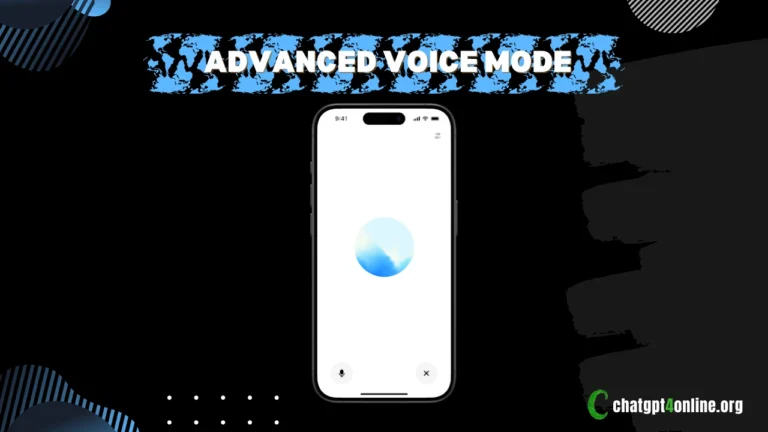
Here’s what ChatGPT Voice actually looks like today.
What Is ChatGPT Voice?
ChatGPT Voice is a conversational interface that lets you speak to ChatGPT and receive spoken responses.
The important difference from ordinary dictation is what happens after you speak. Dictation is primarily designed to turn your speech into editable text. Voice is designed for an ongoing conversation: you speak, ChatGPT responds, you can interrupt, ask a follow-up question, change direction, or continue the discussion without starting over.
ChatGPT Voice also remains connected to the underlying chat. With Live, ChatGPT can display its response as text while speaking, and the conversation transcript becomes available in the chat after the Voice session ends. You can therefore have a spoken conversation without losing the text-based record of what was discussed.
That makes Voice considerably more than a text-to-speech feature.
From GPT-4o to Today’s ChatGPT Voice
The story of ChatGPT Voice actually began before Advanced Voice Mode. In September 2023, OpenAI introduced voice conversations in ChatGPT as part of its initial voice and image capabilities. At that stage, the system used speech recognition to transcribe what users said and a text-to-speech system to generate spoken responses.
GPT-4o changed the direction of voice interaction.
When OpenAI introduced GPT-4o in May 2024, it demonstrated a much more responsive form of real-time voice interaction. Advanced Voice Mode subsequently began rolling out to users, with broader availability to paid users following later in 2024.
The early Advanced Voice experience was already capable of more natural interruptions and conversational timing than the older voice interface. OpenAI continued improving it during 2025, including substantial changes to intonation, cadence, pauses, emphasis, and emotional expression. In June 2025, OpenAI also introduced continuous language translation in Voice.
Then came another architectural shift. On July 8, 2026, OpenAI introduced GPT-Live and described it as a new generation of voice models designed for natural human-AI interaction.
That is the point at which the current ChatGPT Voice experience begins.
What Is GPT-Live?
GPT-Live is OpenAI’s newer generation of voice models, and it now powers the latest ChatGPT Voice experience.
OpenAI launched two versions:
GPT-Live-1 – the main Live model for paid ChatGPT users
GPT-Live-1 mini – the Live model used for Free users
The models were rolled out globally across supported ChatGPT experiences beginning July 8, 2026. The interesting part, however, isn’t the model names. It is how GPT-Live was designed.
GPT-Live Uses a Full-Duplex Architecture
Traditional voice systems generally operate in turns. The system listens, determines that you have finished speaking, processes the request, and then responds. But GPT-Live is designed differently.
OpenAI describes it as using a full-duplex architecture, allowing it to listen and speak simultaneously. This lets the model continuously process the interaction and make decisions about whether it should speak, continue listening, pause, interrupt, or invoke a tool.
That architecture is important because human conversations do not normally work like a walkie-talkie.
People interrupt each other. They use short acknowledgements. They pause to think. They sometimes change their sentence halfway through. GPT-Live is designed to handle much more of that conversational timing.
OpenAI claims that the model can use brief conversational signals such as “mm-hmm” or “yeah,” engage in rapid back-and-forth dialogue, or remain quiet when the user needs a moment.
GPT-Live and GPT-5.5: Are They Same Model?
No, they’re not. There is an important technical distinction. GPT-Live is the model responsible for the continuous voice interaction. It is not simply GPT-5.5 converted into a voice interface.
For more demanding requests, GPT-Live can delegate work to another frontier model in the background. OpenAI said that, at launch, GPT-Live would use GPT-5.5 for this delegated work. The voice model can continue interacting with the user while the more complex task is being handled.
This architecture separates two jobs: GPT-Live handles the conversation. A more capable model can handle deeper work when necessary. That distinction allows Voice to remain responsive without forcing the same model to perform every part of the interaction.
This delegation can be used for tasks involving web search, deeper reasoning, or more complex and agentic work.
ChatGPT Voice: Live vs. Advanced vs. Standard
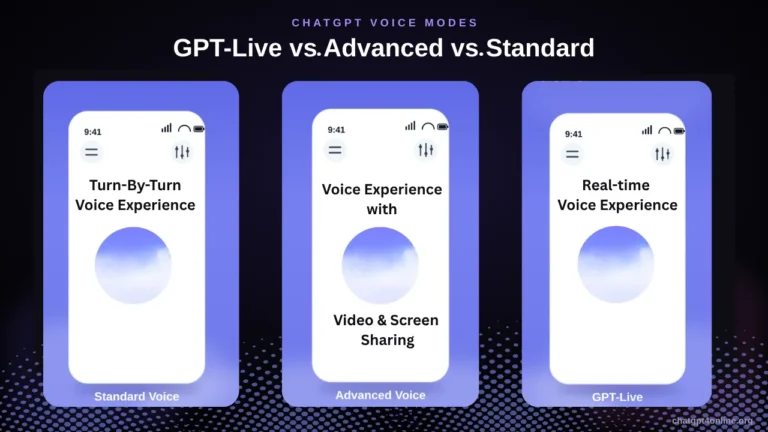
If you open ChatGPT’s Voice settings today, you may see three different experiences.
|
Voice option: |
What it is mainly designed for |
|---|---|
|
Live |
The newest real-time Voice experience powered by GPT-Live |
|
Advanced |
The previous real-time Voice experience, retained for capabilities such as video and screen sharing |
|
Standard |
Turn-by-turn Voice that transcribes speech before generating a response |
The options shown to an individual user can vary according to plan, region, workspace settings, app version, and other account conditions. OpenAI specifically recommends using Advanced when you need supported mobile capabilities such as video or screen sharing.
So, there is an important misconception to avoid: Advanced Voice has not simply disappeared because GPT-Live exists. Instead, OpenAI currently maintains Advanced because some of its capabilities are not available in Live.
What Can You Do With ChatGPT Live Voice?
1. Have a Real Conversation
The most obvious use of ChatGPT Voice is also one of the most important.
You can talk to ChatGPT without composing carefully written prompts. Ask a question, interrupt the response, clarify what you meant, or change the subject.
GPT Live listens while it is speaking, which makes interruptions much more natural than in a conventional turn-based voice system. Background noise, overlapping speech, microphone quality, and network conditions still affect the experience, however.
Live is primarily designed for one-on-one interaction. However, it’s not yet optimized for conversations involving several people speaking at once.
2. Search the Web While Speaking
Voice is connected to ChatGPT’s broader capabilities rather than functioning as an isolated speech system. GPT Live can use web search when available, which means you can ask about information that requires current data and continue the conversation verbally.
For example, you can ask about a recent event, a current fact, or something you have just heard about without leaving Voice mode to type a search query.The response can then continue as part of the same conversation.
3. Use Memory
GPT Live can use ChatGPT memory when that feature is available to your account. This allows Voice conversations to benefit from relevant information ChatGPT has retained rather than treating every spoken interaction as completely independent.
Memory availability and behavior depend on the user’s account settings, so it should not be interpreted as Voice automatically remembering every conversation.
4. Mix Speech, Text, and Images
One of the less obvious features of Live is that you don’t have to remain purely in voice mode.
GPT Live works with text and images in the same conversation. You can type instead of speaking or attach an available image while Voice is active, and ChatGPT can continue responding through Voice.
This creates a hybrid interaction: You can speak a question, attach an image, type a clarification, and then hear the answer.
That is considerably more flexible than treating Voice as a separate application.
5. Follow the Response in Text
While Live is speaking, ChatGPT displays the response as text in the conversation.
After the Voice session ends, the conversation transcript is added to the chat history. However, the transcript may not exactly match what was said, particularly when people speak over one another, background noise is present, or the conversation moves quickly.
The transcript is useful for reviewing a conversation, but it should not automatically be treated as a perfect recording of every spoken word.
Practical Uses for ChatGPT Voice
The strongest use cases are those where speaking is more convenient than typing.
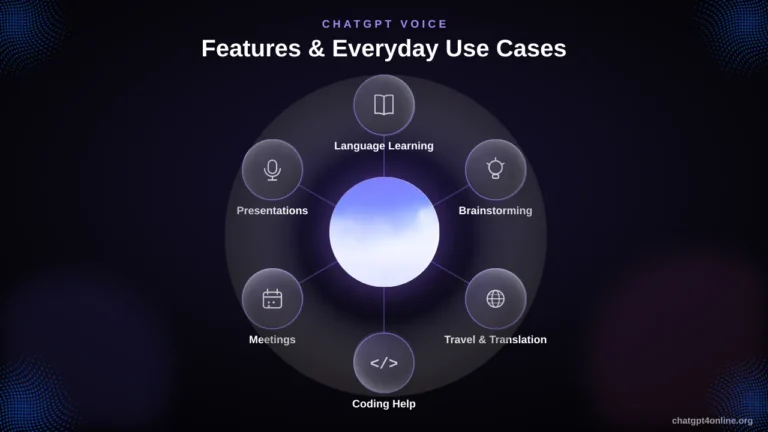
1. Language Learning
Students can use ChatGPT Voice to practice languages, discuss difficult concepts, rehearse oral answers, or ask follow-up questions while studying. Instead of typing individual sentences into a translator, you can hold a spoken conversation, ask for corrections, and continue responding in the target language.
A spoken interaction also makes language practice feel less like completing exercises and more like having an actual conversation.
2. Exam Preparation
ChatGPT Voice can turn exam preparation into an interactive conversation rather than a sequence of typed questions. For example, a student preparing for an oral exam could say: “Act as my examiner. Ask me questions about Shakespeare’s Hamlet, one at a time. Don’t give me the answer unless I get stuck.”
ChatGPT can ask a question, listen to the student’s spoken answer, identify weaknesses, and continue with a follow-up question. The student can then practice explaining ideas naturally rather than simply reading prepared notes.
3. Brainstorming and Planning
Typing can interrupt the way people naturally think through complicated ideas. Voice removes some of that friction.
You can continue explaining your thoughts conversationally, including ideas that occur to you midway through the discussion. ChatGPT can help identify patterns, challenge assumptions, organize the ideas, and turn the conversation into a structured plan.
This is particularly useful during the early stages of a project, when the objective is not yet clearly defined.
4. Travel and Translation
ChatGPT Voice becomes especially useful when communication happens in real time.
For example, while traveling in another country, you may need to communicate with someone who speaks a different language. Instead of typing every sentence into a translation app, you can use spoken interaction to translate a back-and-forth conversation.
A traveler might say:
“Translate everything I say into Spanish, and translate the other person’s Spanish into English.”
That can be more natural for a conversation involving several exchanges. It can also help with practical travel situations such as understanding directions, asking what a menu item means, or preparing phrases before speaking with hotel staff or local businesses.
5. Programming and Technical Problem-Solving
Developers often need to explain a problem before they know exactly what the problem is. Voice can make that process faster.
You can explain the symptoms verbally, answer follow-up questions, and work through possible causes without repeatedly switching between typing and other tasks. Voice is also useful for discussing architecture, debugging strategies, implementation decisions, and technical documentation.
For supported desktop workflows, Voice can also be used alongside Work and Codex experiences where conversational interaction can help direct or coordinate technical tasks.
6. Work Meetings and Idea Capture
Voice can be useful when you need to capture ideas while doing something else. Consider a manager walking between meetings who suddenly thinks of several changes for an upcoming project. Instead of waiting until they can sit down and type, they can explain the ideas verbally and ask ChatGPT to organize them into priorities, action items, or a project outline.
For example:
“I have three changes I want the development team to make next week. First, improve the checkout flow. Second, fix the mobile navigation. Third, add analytics to the signup page. Turn what I just said into a prioritized task list.”
The value here is not simply speech-to-text. The conversation can continue from the initial idea, allowing the user to refine and reorganize the information.
7. Accessibility and Hands-Free Interaction
Voice provides another way to interact with ChatGPT for people who find prolonged typing difficult or who simply prefer speaking.
It can also be useful in situations where typing is inconvenient, for example, while cooking, walking around the house, or working with physical equipment. In such scenarios, user can ask questions, request explanations, and continue a conversation without constantly returning to a keyboard.
8. Practicing Presentations and Public Speaking
GPT Voice can also act as a rehearsal partner. Suppose you’ve a presentation the next morning. You can explain your presentation aloud and ask ChatGPT to act as an audience member.
You may say: “I’m going to practice my presentation. Don’t interrupt me while I’m speaking. After I finish, evaluate my explanation, identify unclear sections, and give me three questions an audience member might ask.”
This gives the speaker an opportunity to practice explaining ideas naturally rather than silently reading from slides.
The same approach can be used for speeches, interviews, sales pitches, classroom presentations, and professional presentations.
When Voice Is Actually Better Than Typing
ChatGPT Voice is not automatically better for every task. Typing remains preferable when you need to enter exact code, carefully edit a long passage, provide a precise URL, or review a response word by word.
Voice has the biggest advantage when the task involves:
– Back-and-forth conversation
– Explaining a complicated problem
– Practicing spoken communication
– Brainstorming ideas
– Real-time translation
– Hands-free interaction
– Following up repeatedly without stopping to type
The practical difference is that Voice lets ChatGPT function more like a conversational partner. Instead of first deciding exactly what to type, you can start talking, clarify your thoughts as you go, and let the conversation develop naturally.
We provide task-specific AI tools for you. These AI tools are powered by the most advanced version of the GPT model.
Does GPT-Live Support Video and Screen Sharing?
GPT-Live does not currently support video or screen sharing. Eligible subscribers can still use those capabilities through Advanced Voice in the ChatGPT iOS and Android apps.
With Advanced, users can share live video through the camera or share their device screen during a Voice conversation. That can be useful when you want ChatGPT to discuss something you are actually looking at:
– A problem displayed in an app
– A website or setting on your phone
– Something visible through the camera
– A visual task that is difficult to describe verbally
If video or screen sharing is the feature you need, Advanced Chat remains relevant.
ChatGPT Voice Has Background Conversations Feature
Voice doesn’t have to stop simply because you leave the ChatGPT screen. You can enable Background conversations in Settings → Voice to continue a conversation while using other applications or while your phone is locked.
This feature lets you keep chatting even when you’re using other apps or your device is locked.
There are conditions that end a background session. For example, it ends if you manually end it, force-close the application, reach your usage limit, or reach the maximum session length. If you are using Advanced screen sharing, locking the screen also stops that screen-sharing session.
This makes background Voice useful for situations where typing would be inconvenient, such as thinking through a problem while walking or discussing ideas while working in another application.
ChatGPT Voice Has Nine Voices
OpenAI currently provides nine selectable voices in ChatGPT.
They are: Arbor, Breeze, Cove, Ember, Juniper, Maple, Sol, Spruce, and Vale.
Each has its own described character. Arbor, for example, is presented as easygoing and versatile, while Cove is composed and direct. Vale is described as bright and inquisitive. You can change the selected voice through Settings → Voice.
It’s important to note that changing the voice does not mean you are changing to a different GPT model. Voice selection controls the spoken persona/output voice, while the underlying Voice experience and model depend on the option available to your account.
Voice is Available in Work and Codex
One of the newest developments is that Voice is moving beyond ordinary ChatGPT conversations.
In the ChatGPT desktop applications for macOS and Windows, Voice can be used with Work and Codex to interact with ongoing tasks and agents. You can utilize it as a way to start tasks, check their progress, ask questions about agents, and coordinate multiple agents through a conversation.
The available capabilities include:
– Starting, prioritizing, interrupting, or redirecting tasks
– Coordinating multiple agents across active conversations and projects
– Resuming existing work using available project context
– Receiving spoken or on-screen progress updates
– Seeing when ChatGPT is listening and controlling the microphone
According to OpenAI, Voice in Work and Codex uses separate usage allowances and pricing. Standalone Voice in Work and Codex is currently not available directly on web or mobile, although paired iOS remote access is supported.
Final Thoughts
ChatGPT Voice has traveled a long way from the basic voice conversations introduced in the early versions of ChatGPT.
GPT-4o and Advanced Voice established the foundation for more natural real-time interaction. The improvements that followed added better expression, translation, video, screen sharing, and other capabilities. GPT-Live now takes the next step by treating voice as a continuous interaction rather than a sequence of isolated spoken prompts.
And there is an important lesson in the current structure of ChatGPT Voice. Newer does not always mean every older capability has been removed. GPT Live is the latest Voice experience. Advanced remains useful when video or screen sharing is required. Standard continues to provide a more traditional turn-by-turn voice interaction.
Voice is becoming an interface through which ChatGPT can search the web, use memory, work with text and images, translate conversations, and in supported Work and Codex environments, help direct ongoing AI tasks.
Discover the funnier and unique use cases of Advanced Voice Mode by ChatGPT Plus Alpha users.

Albert Haley
Albert Haley is the author behind ChatGPT 4 Online, where he writes about artificial intelligence, AI tools, and the latest developments in the field. With a strong interest in making AI easier to understand and use, he focuses on explaining complex concepts in clear, practical language. His goal is to help readers understand new technologies, discover helpful tools, and keep up with developments that matter. Author Bio