Discover Devin AI: The First AI Software Engineer
Devin AI is the fisrt AI Software Engineer capable of planning projects, generating code, debugging errors, developing websites, creating software, and completing development tasks with minimal human guidance. You can perform all these intricate tasks with a simple prompt.
This makes it one of the first AI systems designed to function as a true AI software engineer rather than just a coding assistant.
This AI assisted software development tool stands out because it can effectively anticipate and strategize complex tasks. It can make numerous decisions autonomously, learn from its errors, and continuously improve its performance.
With all the essential tools readily accessible, this AI tool empowers human engineers by providing assistance in various software engineering efforts.
Devin AI has demonstrated its proficiency by successfully navigating engineering interviews conducted by top AI companies, showcasing its competence and adaptability in the field. In these assessments, which likely included tasks about AI and software engineering, Devin proved its mettle by meeting and surpassing expectations, as claimed by Cognition.
How Does Devin AI Work?
Unlike traditional AI coding assistants that only generate code snippets or answer programming questions, Devin AI works like an autonomous software engineer. You give it a goal in plain English, and it plans the work, writes code, tests its changes, fixes errors, and reports the results with minimal human involvement.
Here’s how the process typically works:
Step 1: Understands your request
You describe what you want to build or fix- for example, “Add Google login to my app” or “Find and fix the payment bug.” Devin analyzes the task, breaks it into smaller steps, and creates a plan before writing any code.
Step 2: Explores your codebase
Devin scans your project files, understands the code structure, reads documentation, and identifies the parts of the application that need to be modified. This helps it make changes that fit your existing project instead of generating isolated code.
Step 3: Writes and edits code
Once it understands the project, Devin writes new code, updates existing files, creates functions, refactors code, and adds documentation when needed. It can work across multiple files instead of focusing on a single code snippet.
Step 4: Uses developer tools
Devin AI works inside a real development environment. It can run terminal commands, install dependencies, execute scripts, search documentation, interact with APIs, and use common developer tools to complete tasks just as a human engineer would.
Step 5: Tests and debugs automatically
After making changes, Devin AI runs tests, checks for compilation errors, analyzes logs, and debugs issues. If something doesn’t work, it attempts to identify the cause, modify the code, and test again until the task is completed successfully.
Step 6: Delivers the final result
When the work is finished, Devin summarizes what it changed, explains its approach, and can prepare a pull request for review. You can inspect the changes, request revisions, or merge them into your project.
Why Is Devin AI Different?
The biggest difference is that Devin doesn’t stop after generating code. It follows the entire software development workflow – from understanding requirements and writing code to testing, debugging, and delivering a working solution. This allows developers to delegate repetitive or time-consuming engineering tasks while staying in control of the final review.
Although Devin AI can complete many programming tasks independently, it performs best when given clear instructions, access to the required repositories, and well-defined project requirements. Human oversight is still important, especially for production systems, security-sensitive code, and architectural decisions.
Learn also how Gemini Advanced works.
What Can Devin Actually Do?
According to its founder company, Cognition Labs, Devin AI can perform the following tasks:
Independently Debugging Code
This AI tool can find and fix problems in code without needing help. For instance, it can help you keep your book about competitive programming free of errors.
Developing And Deploying Apps
It knows how to create and launch apps from start to finish. For example, it can create a website where you can play a game. It can keep adding new things to the game that users ask for, and it can put the app on Netlify so others can use it.
Contributing to Well-Established Repositories
Devin AI is skilled at making contributions to well-established and active software projects. For instance, as part of the SWE-bench benchmark, it could address an issue related to logarithm calculations within the sympy Python algebra system.
It solves 13.86% of issues completely, surpassing the old record of 1.96%. Other top models can only solve 4.80% even with the right files.
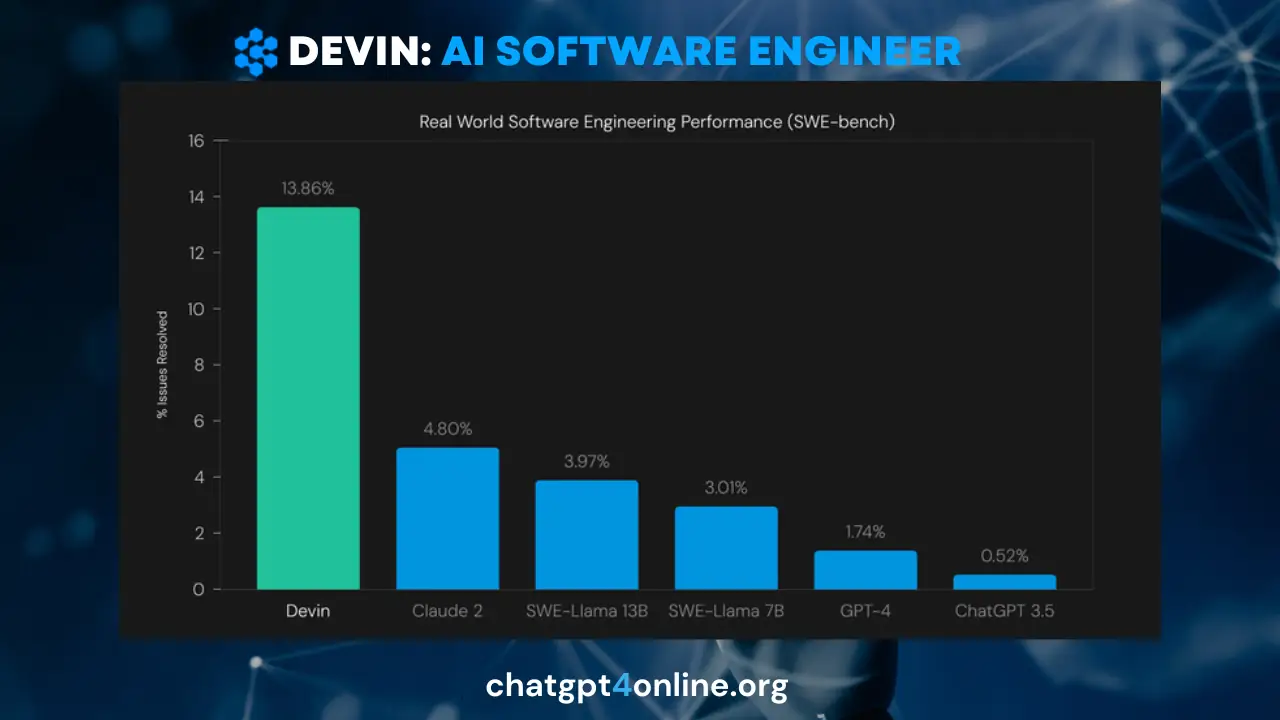
So, it can take charge of configuring the coding environment. It can replicate the bug, devise a solution, and independently code and test the fix.
Use ChatGPT4 for free without any hassle of registration or login.
Improving Its Own Models and Open-Source Projects
Devin knows how to train and improve its own AI models. For example, it can set up a process to refine a big language model using only a link to a research project stored on GitHub.
This AI development tool can handle issues and fulfill requests for improvements in open-source projects. With just a link to a problem posted on GitHub, it takes care of all the necessary preparations and gathers the required information.
If you want to enhance the productivity of your coding tasks, use these customized ChatGPT coding prompts.
Learning New Tech
Devin learns how to use new tech stuff. For instance, after reading a blog, it uses ControlNet on Modal to make pictures that hide messages for you.
Performing Jobs on Platforms like Upwork
Devin AI’s capabilities extend to performing real tasks on platforms like Upwork, Cognition AI Lab claimed. In this scenario, its responsibilities involve writing and debugging code to execute a computer vision model.
This tool also collects and analyzes data generated by the model, ultimately compiling a comprehensive report.
How To Access Devin AI?
Getting started with Devin AI is simple. Visit the official Devin website, create an account, and choose the plan that fits your needs. If you only want to explore the platform, the Free plan lets you try Devin AI with limited usage at no cost.
For individual developers who use Devin AI regularly, the Pro plan ($20/month) offers a daily and weekly usage quota, supports Devin for Terminal and the Windsurf IDE, includes integrations with Slack, Linear, and MCP, and lets you purchase additional usage with pay-as-you-go credits when you exceed your quota.
If you need even more AI coding time, the Max plan ($200/month) includes everything in Pro but provides a significantly larger weekly usage quota with no daily limit, making it a better choice for heavy users.
If you’re working with a team, the Teams plan starts at $80/month and supports unlimited team members. It includes both Full Seats for regular users and Flex Seats for occasional users, while sharing on-demand credits across the entire team for more cost-effective collaboration.
Once you’ve selected a plan, you can connect your repositories and development tools, then start assigning coding, debugging, testing, and automation tasks to Devin directly from your browser.
Lights, Camera, AI – AI Filmmaking is a new reality. Discover AI Filmmaking tools, and learn the benefits of using AI in Filmmaking.
Will Devin Replace Software Engineers?
Software Engineers who are newbies in the field or students who are entering the Software Engineering field have a big question about their future after the launch of Devin, which is called an AI Software Engineer by its founder company.
It’s said that the tools like this will replace human Software Engineers; it’s an absolutely wrong assumption. Let me explain how:
It’s not an AI Software Engineer in a true sense, it’s actually an AI Assistant: a helping tool for Engineers. It uses previous models’ APIs with certain customizations.
In the industry, highly complex software are developed, and this tool can’t develop them alone at all, not even 5%. Yes, it can speed up the process of development when used by smart Software Engineers.
Moreover, the affordability factor needs to be considered when determining the success of a tool like Devin. It’s not a completely free AI tool. Suppose developers start using it like Stack Overflow or Google, it will cost them a lot because of its computing cost or token consumption.
An average developer couldn’t afford it. This tool will cost more than a Human Software Engineer.
Nothing to Worry About, Celebrate It Actually
Software Engineers should celebrate Devin because it simplifies various coding tasks for them. Software Engineering is such a painful field, as you face many debugging challenges, and it takes hours to find the bug in the code. The 1-hour task can go on for days.
With the help of Devin AI, you, as a Software Engineer, can increase both your productivity and profit. Where you produce 1 software project within a month, you can produce 2 within the same time.
If you’re a freelancer and have 3 months to complete 1 software, you’ll complete 2 software within the same period. So, your productivity and thus profit will boost.
This AI software development tool will not replace Software Engineers. Perhaps, it can replace those fake Software Engineers who rely on templates and copy/paste code from Stack Overflow, who never code themselves, have no sense of business logic, and don’t know how to build algorithms.
Smart Engineers should celebrate it as this is one of the AI assistant tools for them to ease their workload. Devin AI is just a helping tool for smart SEs.
Newbies and students shouldn’t worry about this development; you should simply grow yourself by using AI. Your purpose shouldn’t be survival but rather to grow yourself.
Both human touch and AI touch can make a project successful. AI alone can’t do wonders yet.
Final Thoughts
Devin AI’s combination of forward-thinking capabilities and comprehensive toolset positions it as a first groundbreaking solution ever introduced in AI industry for enhancing productivity and efficiency in software engineering efforts.
AI software tools like Devin AI bring the risk of replacing human software developers or engineers, escpecially the average ones. So, now it has become a kind of essential thing to use these development tools to stay relevant in the current AI industry.
However, such AI software development tool are designed to support human engineers rather than replace them, aiming to streamline their workflow and enhance efficiency.

Albert Haley
Albert Haley is the author behind ChatGPT 4 Online, where he writes about artificial intelligence, AI tools, and the latest developments in the field. With a strong interest in making AI easier to understand and use, he focuses on explaining complex concepts in clear, practical language. His goal is to help readers understand new technologies, discover helpful tools, and keep up with developments that matter. Author Bio